
Custom Elements: Documents
With document templates, you build your own reusable documents for your company : from ready-made building blocks like headings, text fields, tables, and images. Your team then fills them in.
You manage Custom Elements in the Webapp under Custom Elements of your company. Creating and editing is restricted to company admins; published templates can then be used by all members of the company. Use the toggle at the top to switch between Documents and API Interfaces.
Building a document template
- In Documents mode, tap the Plus button on the left to create a template.
- Add elements from the building block palette and arrange them using drag and drop.
- Name fields, set placeholders, and mark them as required where needed.
- Publish using Publish.
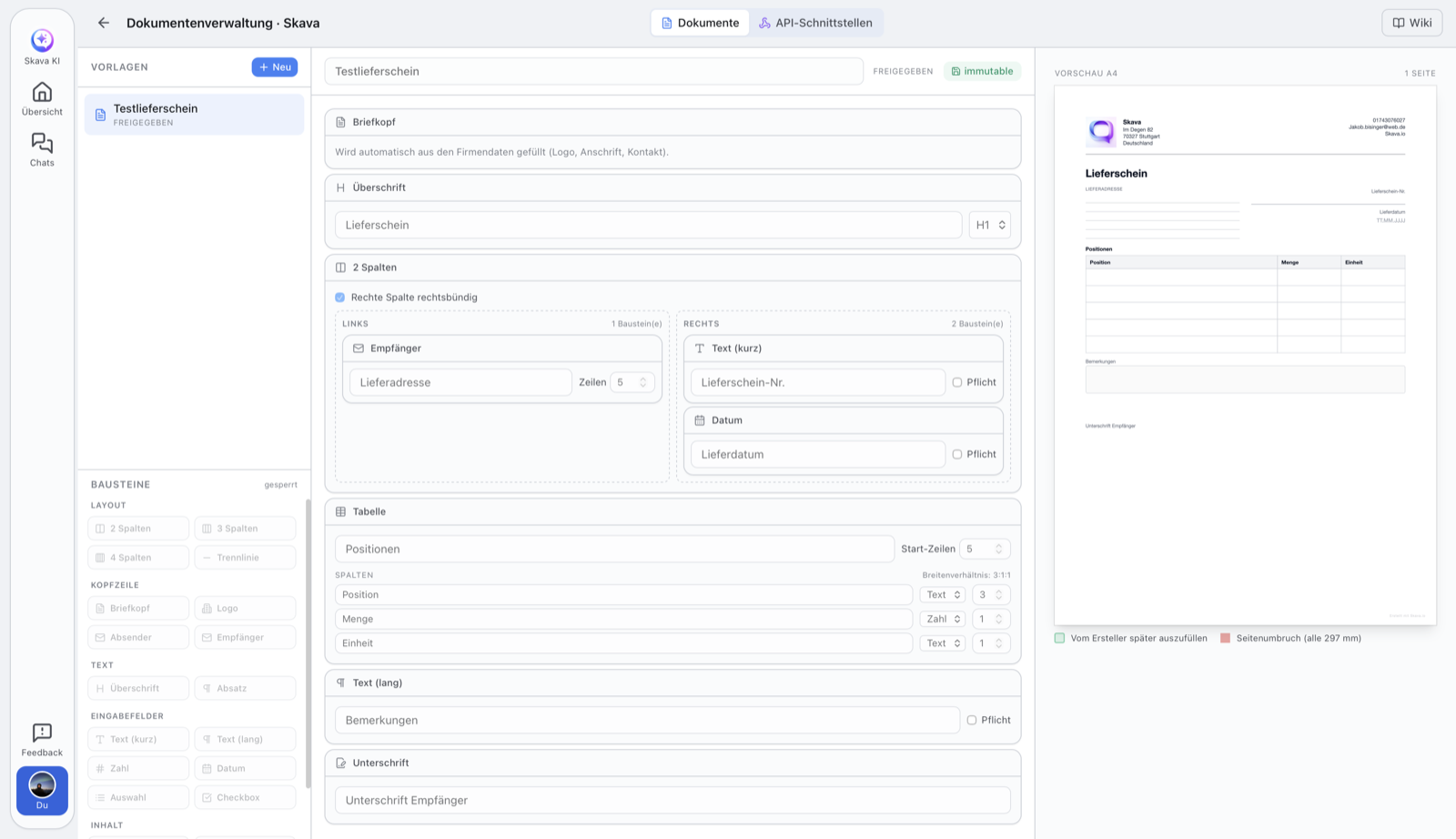
Draft and publication
Each template starts as a draft and can be freely edited : changes are saved automatically. Once everything is ready, you publish it with Publish.
Published templates are immutable so that documents already created remain reproducible. If you want to make changes, create a new version.
Starting from a ready-made template
You do not have to start with an empty sheet. When creating a template Skava offers eleven starting points that you then rebuild freely: delivery note, quote, invoice, daily report, timesheet, todo list, measurement sheet, acceptance protocol, defects protocol, site diary and maintenance protocol. Each comes with the usual fields, from the recipient block to the line item table.
Filling in and sending in chat
Released templates are available to every member of the company in chat, with their name and the company logo in the plus menu. There is no intermediate dialog: you tap the template and start filling it in.
- In the chat, tap Plus at the bottom and tap the template.
- Fill in the fields. The file name is pre-filled with the template name and today's date; you can change it.
- Before sending, look at the PDF preview. It comes from the same renderer that produces the final document, so there are no surprises.
- Send. The finished PDF sits in the chat as an ordinary attachment, so it can be forwarded, filed in the drive and found again later.
Skava does not run the generated document through the AI analysis that otherwise processes uploaded files. That is not about saving effort but about accuracy: the content is known, because it comes from your input. It is stored on the attachment together with the template and its version, instead of being guessed back out of the PDF afterwards.
Related
Do you want to send filled values to your own system instead? See Custom Elements: API Interfaces.
Webapp and mobile app
Templates are created, edited, and published in the webapp : the editor with building block palette is designed for larger screens.
Filling in, previewing and sending work exactly the same on mobile. Only setting up the templates happens in the web app.
Frequently Asked Questions
What is a document template in Skava?
A reusable template for your company that you assemble from building blocks (headings, text fields, tables, images). Your team then fills them in to create specific documents.
Who is allowed to create document templates?
Creating and editing is restricted to company admins. Published templates can then be used by all members of the company.
Why can't I edit a published template anymore?
Published templates are immutable so that documents already created remain reproducible: every generated PDF carries the template id, its version and the values entered. To make changes, create a new version.
How do I fill in a template in chat?
In the chat tap Plus and then the template itself, it sits there with its name and the company logo. Fill in the fields, adjust the pre-filled file name, look at the PDF preview and send. The finished PDF then sits in the chat as an ordinary attachment.
Do I have to build every template from scratch?
No. When creating one you get eleven starting points, among them delivery note, daily report, timesheet, measurement sheet, acceptance and defects protocol and site diary. You take the closest one and rebuild it.
How do I send values to my own system instead?
For that, there are API Interfaces : a form whose values are sent as JSON to your backend.