
Custom Elements: API
An API interface is a form whose filled values Skava sends as JSON to an address you specify (your backend). This way you can connect Skava securely with your own systems.
You manage API interfaces in the Webapp under Custom Elements → toggle API Interfaces. Creating and editing is reserved for company admins; released interfaces can then be triggered by all members of the company.
Set up an API interface
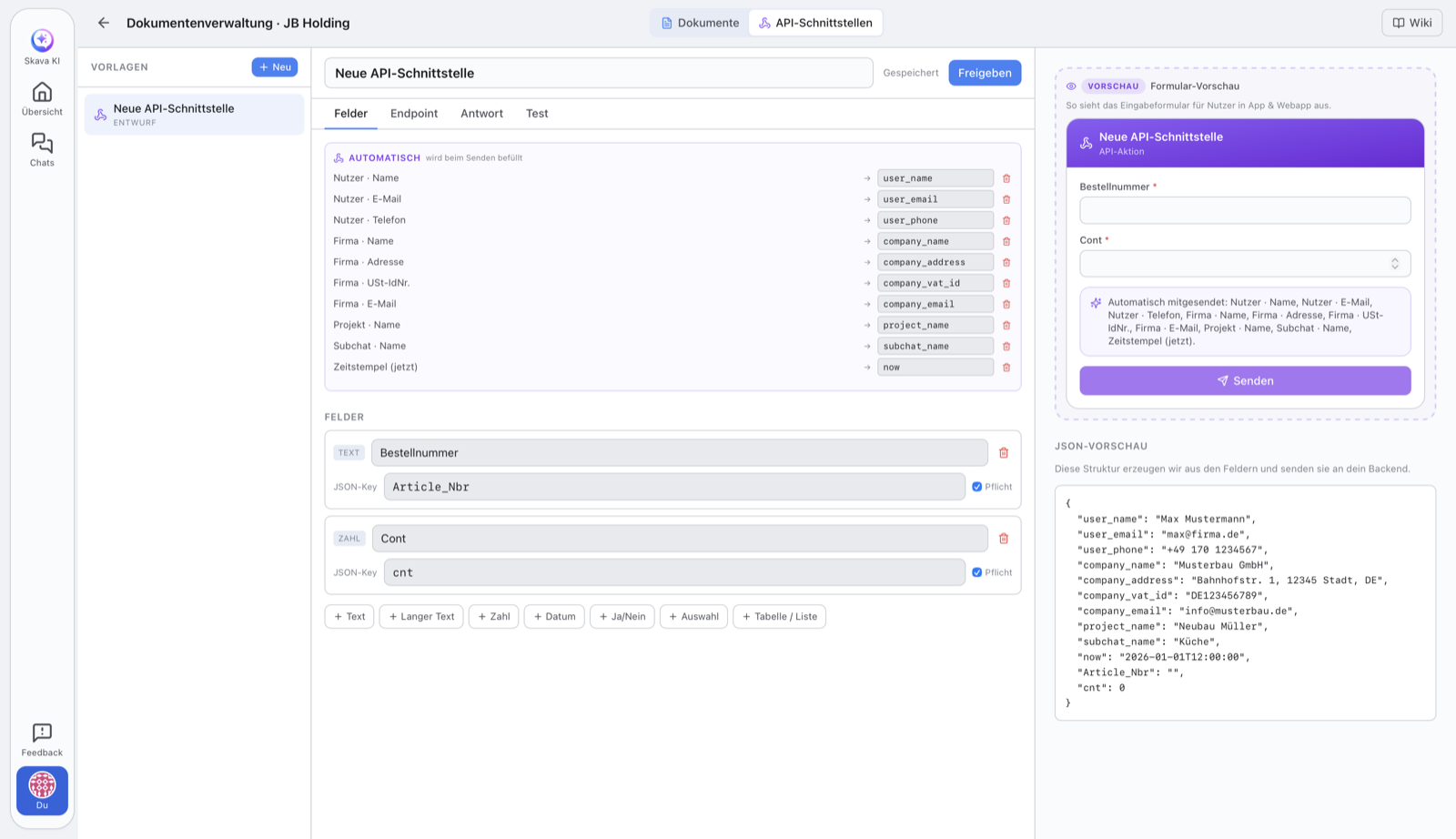
An interface consists of input fields (they form the JSON), the target address, and authentication.
- Create fields: Each field gets a JSON key. On the right you see live the JSON preview, which is sent to your backend exactly this way.
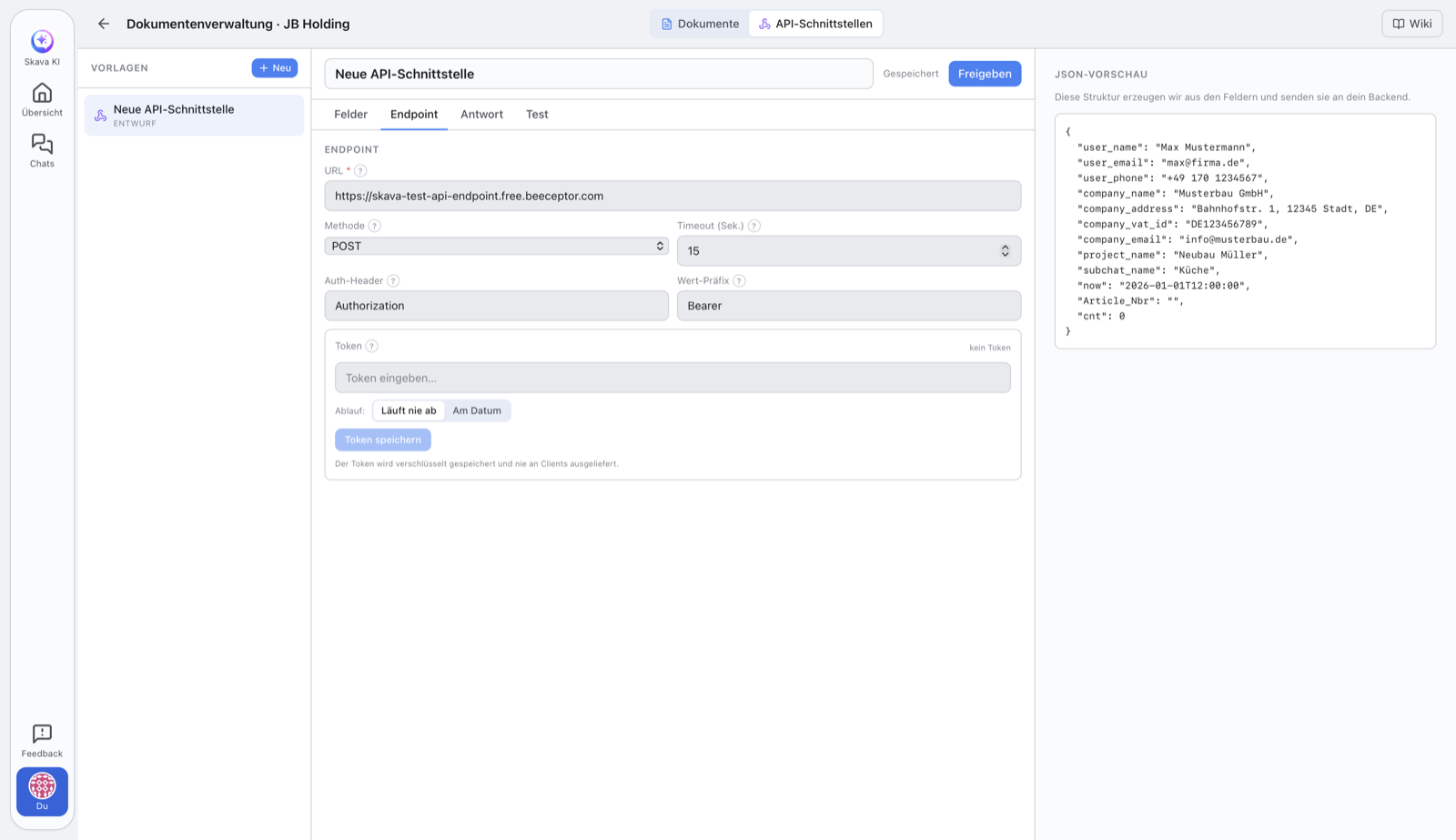
- Address (URL): the
https://address of your backend. Only HTTPS and publicly accessible addresses are allowed (see Security below). - Method:
POST(default),PUT,PATCH, orGET. WithGETthe values are appended as query parameters instead of being sent in the body. - Authentication: Set the header name (e.g.
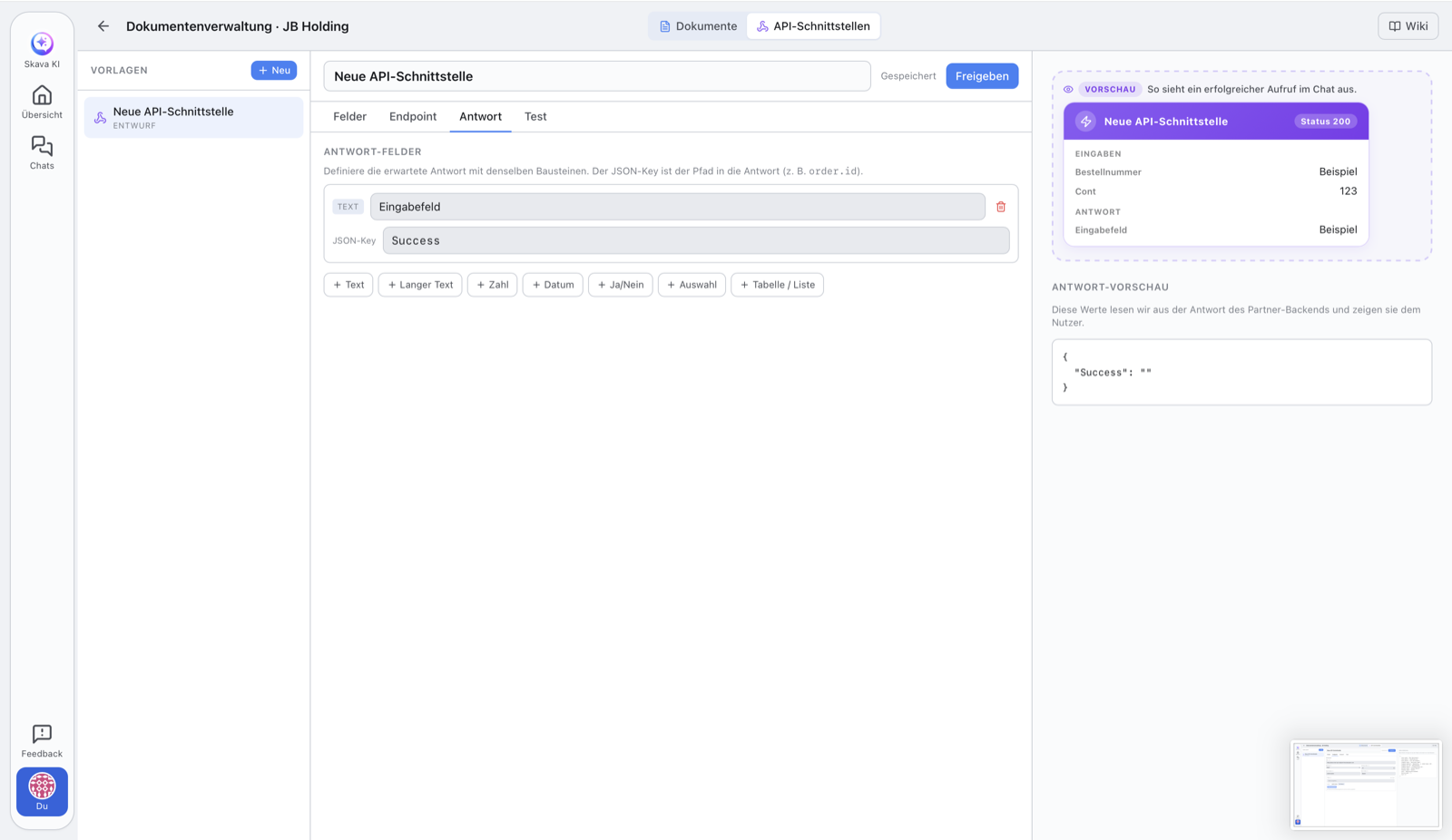
Authorization) and value prefix (e.g.Bearer), then save the token. Optionally set an expiration date. - Response fields (optional): Define by path which values from the backend response should be displayed : e.g.
order.idoritems[0].sku. - Check with Ping and Test Request, then Release.
Store token securely
The token is stored encrypted and never returned to clients : the app only shows whether a token is set and when it expires. When sending, Skava appends it server-side to the configured header. If you set an expiration date, Skava refuses the call after expiration and asks you to renew the token.
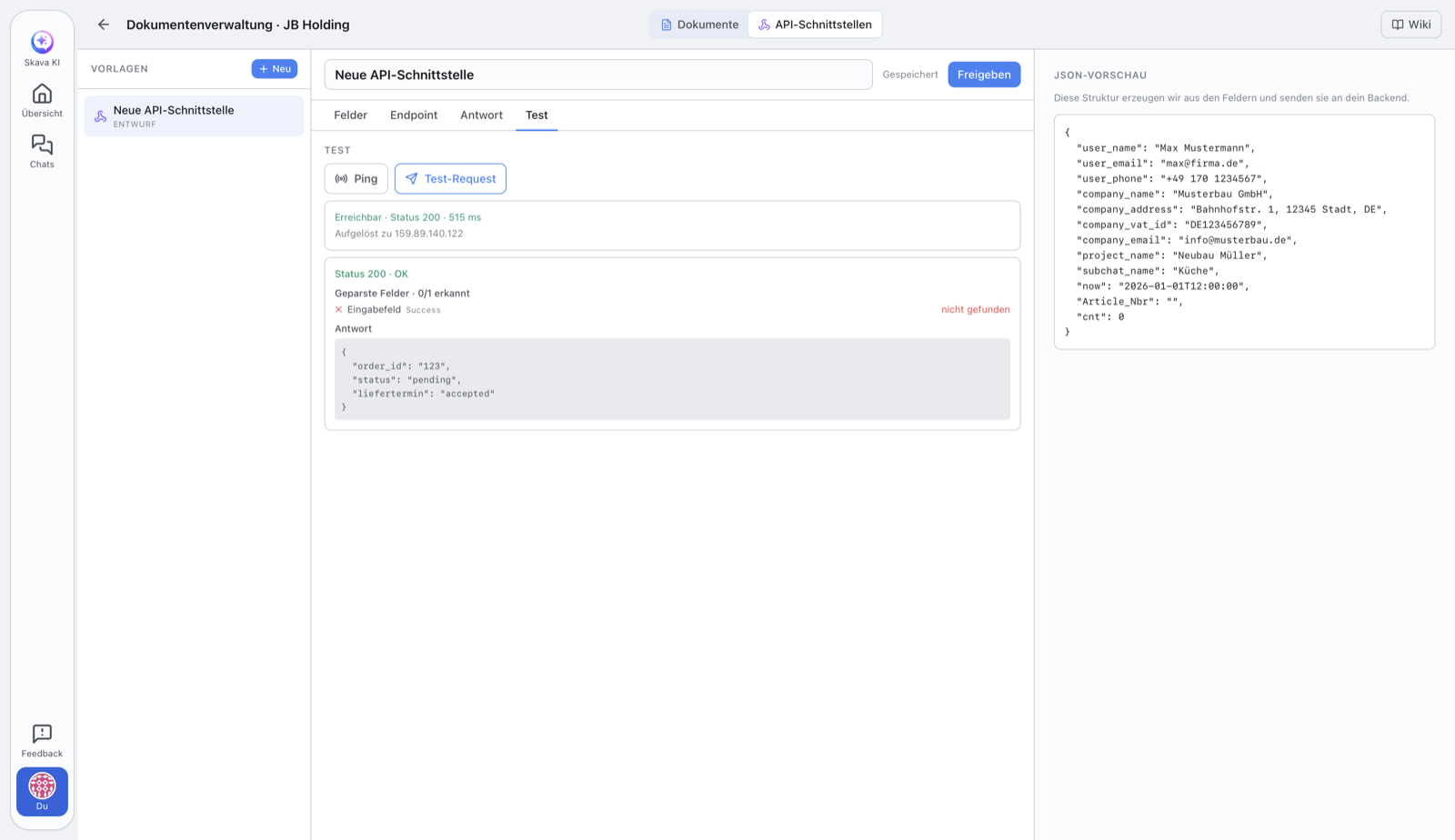
Testing: Ping and Test Request
- Ping : a light reachability check. It only checks whether your address responds, and does not send token or form data in the process. Shows reachability, status, and response time. Ideal as a first step.
- Test Request : the real trial run: sends sample data including token to your address and shows you the complete response as well as the extracted response fields.
As an admin, you can run both while still in draft mode to verify the integration before release.
Draft and Release
Each interface starts as a draft and can be freely edited. Once everything is ready, you release it with Release.
After release the target address, method, fields, auth header and time limit are fixed. That is intentional: nobody can quietly redirect where the data goes. Exactly three things stay changeable, because operations need them: the token and its expiry (so an expired or burned token can be replaced) and the audience, that is whether only your own team or also partner companies may trigger it in chat. For anything else you create a new version.
Security
To prevent the interface from being misused, strict rules apply: only HTTPS addresses are allowed, and the address must point to a public target address : internal addresses (e.g. localhost, private networks, or cloud metadata) are rejected. Skava checks this on every call, connects exactly to the verified address, follows no redirects, and limits timeout and response size.
How the team uses a released interface
Once an interface is released, all company members can trigger it directly from a chat, no editor needed. There is no collective entry and no intermediate dialog: every released element sits in the plus menu under its own name, with the logo of the company offering it.
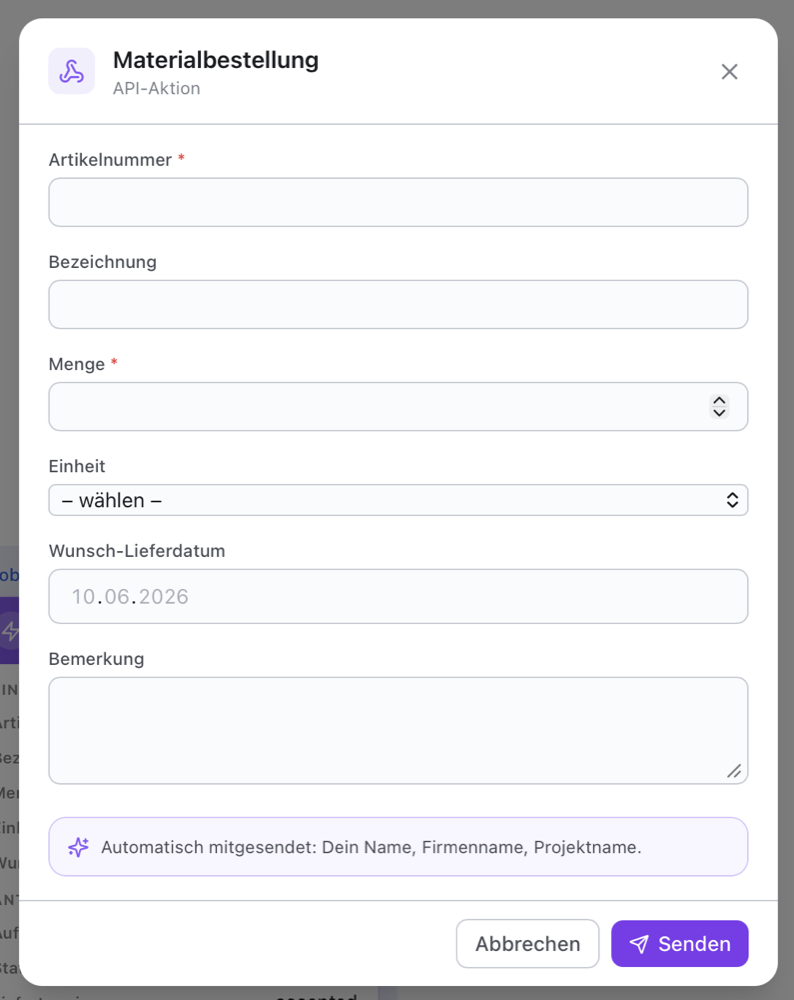
- In the chat, tap Plus at the bottom and tap the element you want, for example Material order.
- Fill in the form and Send.
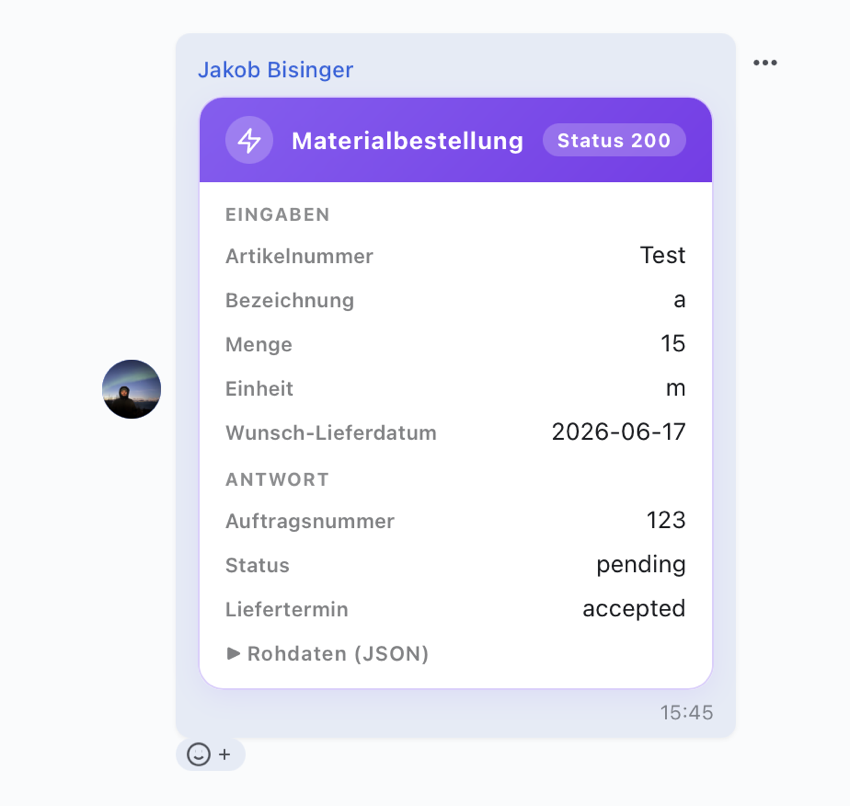
- The result appears as a card in the chat, visible to everyone in the chat.
Let the AI build an element
As a company admin you do not have to use the editor yourself. Tell the Skava assistant in the chat, for example "build me an order form for my catalog with quantity and delivery address". It creates a draft from that, can change fields one at a time later, and it knows your uploaded article catalog: for orders it suggests the product picker rather than a text field for the article number.
What it may also set: endpoint and method as well as the audience ("company members only" or "also outsiders in the same chat"). For the audience it asks first instead of just setting it, because it decides who may run something from outside.
What it explicitly does not touch: the access token. It never asks for one and never accepts one, because chat messages are stored. You enter it yourself in the editor, otherwise no call goes out. And it cannot publish: the last step stays with you, so nothing becomes visible to customers unchecked.
Who may run it
The "Endpoint" tab says who may use an element. The default is the members of your company. The second setting opens it up to outsiders, but only in a chat where someone from your company is present too: exactly the case it is meant for, the customer ordering from you. When your company leaves the chat, the permission ends by itself.
Products from your own catalog
Once you have uploaded your article catalog, the builder offers a product picker block. There are no options to maintain: the list is your catalog. The person ordering searches it, sees the image, name and article number, and your backend receives the article number. Skava rejects a number that is not in your catalog. For the quantity, put a normal number field next to it.
Define the card yourself
Your backend decides what the card says. Skava only checks shape, size and safety, never meaning: it knows neither order states nor field names. To do that, answer with a card object:
{"card": {"v": 1, "title": "Order 10001", "state": "pending", "status_text": "Being picked", "fields": [{"label": "Tracking number", "value": "DPD123456789"}]}}
- v must be the integer 1. Without it the answer does not count as a card and the response mapping configured in the element applies.
- state is colour and icon only:
ok,pending,warnorerror. Anything that carries meaning goes into status_text as free text. - fields is a list of label and value, at most 20 entries. Values that are too long get shortened rather than rejected, so an order never fails over a detail.
The user's inputs belong to the server: they stay untouched no matter what your backend sends. They are the record in the chat of what was actually submitted.
Reporting the status later
When the element runs, Skava sends two extra values: callback_url and callback_token. Report a new state there later and a new card appears in the chat, on the phone too, while someone is looking. The previous one stays, so it is readable when which state was reported. Send the same card object as above, via POST with the header Authorization: Bearer <callback_token>. Three optional values go next to the card:
- seq: your own counter. A report with a smaller or equal value is discarded, so two reports cannot overtake each other.
- final: closes the interaction. The token becomes invalid and the card is final.
- notify: set to
falseto post the card quietly, with no unread count and no notification. For intermediate steps that should not wake anyone. Without it, the card is a perfectly normal message.
An interaction may post at most 50 cards. The same report twice does not produce a second card.
Skava answers with 200 and a list of hints if anything was shortened or dropped, and with 422 if the card was unusable. An interaction accepts reports for 90 days.
The cards are posted by Skava's system sender, not by the person who ran the element and not by an account of your own company. Whose system is writing is stated in the card's title.
A complete example to copy lives in the repository under example_order_server/ and runs at api.skava.io.
Related
Do you instead want to build a fillable document template? See Custom Elements: Documents.
Frequently Asked Questions
What is an API interface in Skava?
A form whose filled values Skava sends as JSON to an address you specify (your backend) : handy for connecting Skava with your own systems.
Who is allowed to create and trigger API interfaces?
Creating and editing is reserved for company admins. A released interface can then be triggered by all members of the company.
What is the difference between "Ping" and "Test Request"?
Ping only checks whether the address is reachable : without token and without data. Test Request sends sample data including token and shows the complete response.
Is my API token secure?
Yes. The token is stored encrypted and never delivered to clients. The app only shows whether a token is set and when it expires.
Which addresses are allowed as endpoints?
Only publicly accessible https:// addresses. Internal targets like localhost, private networks, or cloud metadata are rejected : this protects against misuse of the interface.
Why can I no longer change a released interface?
Target address, method, fields and auth header are fixed after release, so nobody can quietly redirect where the data goes. The token, its expiry and the audience (own team only, or partner companies too) stay changeable; that is exactly how you replace an expired token. For anything else you create a new version.